Cellular modems can draw transmit bursts far beyond what a small ESP32 board can supply.
UART modem target
SIMCom ESP32 UART wiring, pinout and AT modem setup
Connect SIMCom cellular AT modem modules such as SIM800, SIM7600, A7600 or A7670 to ESP32 over UART, then check TX/RX wiring, power, SIM state, antenna and registration before SMS or USSD tests.
Start here when wiring a SIMCom AT modem to ESP32 for UART shell access. Confirm power bursts, voltage level, SIM state, antenna and network coverage before registration tests.
- SIMCom
- AT
- UART
- SIM
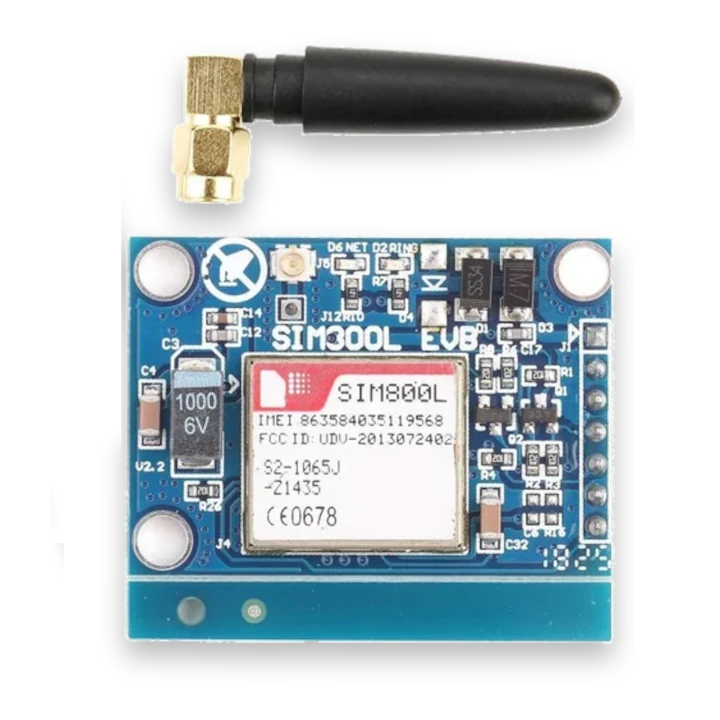
pinout photos
SIMCom cellular modem pinout photos for ESP32 UART wiring
Compare your cellular modem board with these reference pinouts before wiring. SIM800L, SIM7600X, SIM7080G and A7670E breakouts expose power, GND, TXD/RXD, DTR, RST/PWRKEY, antenna, SIM and USB pins differently, so identify the exact board first.
ESP32 UART wiring table
SIMCom ESP32 UART wiring and common checks
Most SIMCom ESP32 modem problems come from weak power, swapped UART lines, missing PWRKEY handling, baud mismatch or SIM and antenna issues.
| SIMCom module pin | ESP32 Bit Pirate connection | Check before AT commands |
|---|---|---|
| VBAT / 4 V input | Stable external modem supply | Use a supply sized for cellular current bursts; do not power the modem from a weak ESP32 3.3 V pin. |
| GND | Common ground | Share ground between the ESP32, modem supply and UART interface. |
| TXD | ESP32 RX GPIO | Cross UART lines correctly: modem TX goes to ESP32 RX. |
| RXD | ESP32 TX GPIO | Check the modem logic level before wiring directly to ESP32 GPIO. |
| PWRKEY | Power-on control GPIO or board button | Follow the module board power-on sequence before expecting an AT response. |
| RST | Optional reset control | Leave reset pulled to its normal state unless the board requires explicit reset wiring. |
| SIM / antenna | Valid SIM card and cellular antenna | Verify SIM insertion, antenna connection and signal quality with AT+CSQ before network tests. |
workflow
Start with SIMCom AT response and registration checks
Confirm the modem power supply, UART voltage levels, TX/RX crossing, SIM state and antenna before network tests. Start with basic AT and signal commands, then check registration before SMS, USSD or data actions.
- 01
Wire TX/RX, ground and the modem power path according to the module requirements.
- 02
Confirm voltage levels before connecting UART pins.
- 03
Start with modem and status commands before SIM or network tests.
- 04
Check registration before SMS, USSD or data features.
- 05
Keep SIM and network tests within your own account and local rules.
Example CLI flow
mode cell
phonebook
sim
network
call
modem
Use this SIMCOM modem sequence for AT response, SIM state and registration checks before SMS, USSD or data tests.
hardware reminders
SIMCom ESP32 UART wiring notes before power
Connect UART TX/RX to ESP32 Bit Pirate, power the modem from a suitable external supply and confirm the board-specific pinout before powering the target.
Wiring View
Confirm whether the modem exposes 1.8 V, 2.8 V or 3.3 V UART levels before connecting TX/RX.
Always connect the antenna before powering the modem, especially during registration or transmit tests.
Use a valid SIM card, confirm local network coverage and unlock the SIM first if the command requires it.
SMS, calls and USSD operations may incur charges depending on your mobile operator and plan.
Before wiring a cellular module, check pinout, voltage, ground reference, antenna, SIM state and whether the selected ESP32-S3 board has the required UART pins free.
task-level guides
Detailed SIMCom ESP32 AT modem recipes
Use these SIMCOM modem guides for UART setup, AT checks, SIM state, registration and cautious network tests.
Use UART AT shell modem
Task-level guide with wiring, commands and troubleshooting steps.
Check cellular modem statusTask-level guide with wiring, commands and troubleshooting steps.
Check cellular network registrationTask-level guide with wiring, commands and troubleshooting steps.
Dump SIM card infoTask-level guide with wiring, commands and troubleshooting steps.
Send SMS from cellular modemTask-level guide with wiring, commands and troubleshooting steps.
Send USSD from cellular modemTask-level guide with wiring, commands and troubleshooting steps.
what it is
What SIMCom AT modems are used for
Cellular AT modems expose a UART command interface for status, SIM information, network registration, SMS, USSD and data-session control.
SIMCom AT modules
Supported SIMCom ESP32 modem families
All SIMCom 2G, 3G and 4G modem modules exposing the standard AT interface should be compatible with the UART workflows.
GSM / GPRS modules
SIM800, SIM808, SIM868, SIM900 and similar SIMCom 2G modules with a standard AT command set.
UMTS / HSPA modules
SIM5320, SIM5360 and similar SIMCom 3G modems can be tested through the same UART AT shell approach.
LTE modules
SIM7600, A7600, A7670 and comparable LTE modules are good targets for registration, SMS, USSD and status checks.
Cellular features require a valid SIM card, local network coverage and, for some commands, an unlocked SIM before testing.
practical value
Why use SIMCom AT modems with ESP32 Bit Pirate
ESP32 Bit Pirate helps turn the modem into a repeatable serial bench target using UART, AT shell and Web Serial workflows.
common symptoms
Common problems with SIMCom ESP32 AT modems
SIMCom modem issues usually come from TX/RX wiring, burst power, UART level, SIM state, antenna, coverage or carrier registration.
No AT response
Swap TX/RX, check baud, ground, power and modem boot state.
Registered nowhere
Check antenna, SIM status, band support and local coverage.
Random resets
Use a stronger power supply; cellular transmit bursts can brown out the module.
pages
Useful SIMCom AT modem next pages
Use these links for AT command setup, UART wiring, SIM status checks, registration tests and hardware power notes.
AT / Cellular
AT command reference for modem status, SIM checks and network registration.
UARTUART reference for TX/RX wiring, baud rate and serial bridge checks.
ESP32-S3 DevKitBoard-specific notes for using Cellular AT modem with ESP32 Bit Pirate.
CardputerBoard-specific notes for using Cellular AT modem with ESP32 Bit Pirate.
Use UART AT shell modemOpen an interactive AT command session.
Check modem statusVerify signal, SIM and modem readiness.
Check network registrationConfirm that the module is attached to a network.
Dump SIM card infoRead SIM identifiers from the modem shell.
Web Serial TerminalUse Web Serial for interactive AT commands, signal checks and registration testing.
Hardware ecosystemDock, adapters, level notes and physical hardware context.
module-specific answers
SIMCom ESP32 AT modem FAQ
Quick answers about SIMCom AT modems, UART wiring, SIM state, power bursts and first registration checks.
Can ESP32 Bit Pirate talk to AT modems?
Yes. SIMCom 2G, 3G and 4G modules with a standard AT interface should work through UART and cellular AT workflows.
Which SIMCom modules are good targets?
SIM800, SIM900, SIM5320, SIM5360, SIM7600, A7600, A7670 and similar AT-command modem boards are practical targets.
Is a SIM required?
Status and identity commands may work without a SIM, but network registration, SMS, calls and USSD need a valid SIM/account and coverage.
Can I power a modem from the ESP32 board?
Often no. Many cellular modules need a separate supply sized for transmit bursts.
Which web tool helps?
The Web Serial Terminal is useful once the firmware exposes the UART shell workflow.
What should I test first?
AT response, signal quality, SIM status and network registration.
project
SIMCOM AT modem inside ESP32 Bit Pirate.
The SIMCOM modem page ties AT protocol notes, UART wiring, modem recipes and browser serial access into one cellular debug path.