FM transmission is regulated. Keep tests legal, local and controlled.
FM and RDS module
Si4713 FM transmitter for ESP32
Wire a Si4713 FM/RDS transmitter module to ESP32 or ESP32-S3 and use ESP32 Bit Pirate for FM lab tests, band checks and controlled radio debugging.
Start here when wiring a Si4713 FM/RDS transmitter module to ESP32 for controlled lab radio tests. Confirm I2C control, audio path and local radio rules before transmitting.
- FM
- RDS
- scan
- trace
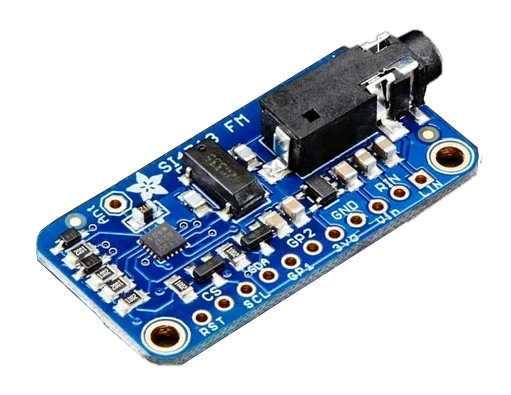
pinout photos
Si4713 FM transmitter pinout photos for ESP32 wiring
Compare your Si4713 breakout with these reference photos before wiring. Use the labels shown here only when your board matches the Adafruit-style Vin, GND, 3Vo, RST, CS, SCL, SDA, LIN, RIN, GP1/GP2, antenna and audio jack layout.
ESP32 I2C and FM table
Si4713 ESP32 I2C wiring and common FM checks
Most Si4713 ESP32 FM transmitter problems come from I2C wiring, missing pull-ups, reset state, antenna setup, frequency choice or local radio restrictions.
| Si4713 module pin | ESP32 Bit Pirate connection | Check before FM output |
|---|---|---|
| VCC | 3.3 V module supply | Use ESP32-safe I2C logic and confirm the breakout board voltage requirements. |
| GND | Common ground | Share ground with the ESP32 before running an I2C scan. |
| SDA / SCL | Selected I2C pins | Match configured ESP32 I2C pins and keep wires short on breadboards. |
| I2C pull-ups | On-board or external pull-ups | Confirm pull-ups are present if the module does not appear during I2C scan. |
| RST | Optional reset GPIO or pulled-up reset | Wire reset if the board needs explicit startup control, otherwise confirm it is pulled correctly. |
| ANT / RF output | FM antenna or test antenna | Connect the required antenna and start with low-power lab tests. |
| Frequency | Selected FM channel | Use only legal, unused frequencies for your location and avoid sensitive radio environments. |
workflow
Start with low-power Si4713 lab checks
Confirm I2C control, module power, audio input and antenna setup before RF output. Start with low-power lab checks and frequency scans, then transmit only within local radio rules.
- 01
Wire the module through its documented control bus and power pins.
- 02
Confirm the module address and power before starting RF output workflows.
- 03
Use sweep, trace and waterfall recipes in a controlled local lab setup before any broadcast test.
- 04
Follow local radio rules and keep output power and tests appropriate.
- 05
Use the FM protocol page for exact firmware behavior.
Example CLI flow
mode fm
config
sweep
trace 101.7
waterfall
broadcast
Use this Si4713 sequence for low-power lab checks before any RF output configured under local rules.
hardware reminders
Si4713 FM wiring notes before RF output
Confirm Si4713 I2C wiring, reset line, audio input, antenna setup and local RF limits before transmission tests.
Wiring View
Use the antenna and wiring recommended by the module design.
Control bus problems will look like radio problems if detection is skipped.
Before wiring a module or target chip, check pinout, voltage, ground reference and whether the selected ESP32-S3 board has the required pins free.
task-level guides
Detailed Si4713 FM transmitter module recipes
Use these Si4713 guides for I2C control, audio input checks, antenna setup and legal low-power FM tests.
what it is
What Si4713 is used for
Si4713 modules provide FM transmitter / RDS-related hardware that can be controlled from an embedded board in a lab environment.
practical value
Why use Si4713 with ESP32 Bit Pirate
ESP32 Bit Pirate links the module to wiring, scan and trace recipes so FM experiments are repeatable from the same serial workflow as the rest of the bench.
common symptoms
Common problems with Si4713 FM transmitter module
Si4713 failures usually come from I2C control, power, antenna, audio path or output configuration. Confirm local RF rules before transmit tests.
Module not found
Check I2C wiring, address, power and pull-ups.
No RF behavior
Confirm module support, antenna and that the command path is active.
Unexpected interference
Stop transmitting and review local rules and antenna/output configuration.
pages
Useful Si4713 next pages
Use these links for Si4713 wiring, FM band scans, one-frequency traces, board choices and hardware context.
FM
FM mode reference for Si4713 scans, traces and controlled transmitter tests.
I2CI2C reference for Si4713 control wiring and address checks.
ESP32-S3 DevKitBoard-specific notes for using Si4713 FM transmitter module with ESP32 Bit Pirate.
Wire Si4713 FM moduleConnect I2C power and antenna for FM work.
Scan FM bandSweep the FM band to find active frequencies.
Trace one FM frequencyFocus on one frequency during debugging.
Web Serial TerminalUse Web Serial for Si4713 setup, FM scans and controlled trace commands.
Hardware ecosystemDock, adapters, level notes and physical hardware context.
module-specific answers
Si4713 FM transmitter module FAQ
Quick answers about Si4713 wiring, FM/RDS scope, antenna setup and controlled radio tests.
Can ESP32 Bit Pirate work with Si4713?
Yes, where the FM module workflows are supported by the firmware and wiring recipes.
Is this a general SDR?
No. Si4713 is a specific FM/RDS module path, not a software-defined radio.
Do radio rules matter?
Yes. Keep FM tests controlled and compliant with local regulations.
Which protocol does it use?
The module is connected to FM workflows and usually controlled over I2C.
Where should I start?
Start with the wiring recipe, then scan or trace one frequency.
project
Si4713 FM inside ESP32 Bit Pirate.
The Si4713 page connects FM protocol notes, I2C control, audio and antenna wiring, legal test limits and browser serial access.