The data line needs a suitable pull-up; long cables may require care.
1-Wire contact target
1-Wire iButton reader for ESP32
Wire 1-Wire iButton targets to ESP32 or ESP32-S3 and use ESP32 Bit Pirate to read ROM IDs, verify presence pulses and debug data line timing.
Start here when connecting 1-Wire iButton or DS1990A readers to ESP32 for presence detection, ROM ID reads and pull-up validation.
- 1-Wire
- iButton
- target
- read
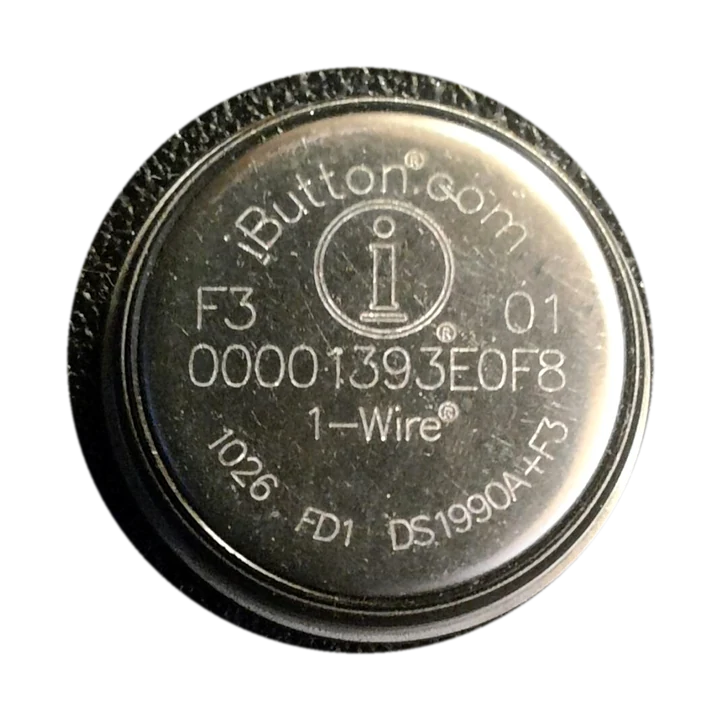
workflow
Start with stable iButton ROM reads
Confirm the iButton contact, common ground and 1-Wire pull-up before scanning. Start with repeated ROM ID reads, then use timing or memory recipes only after the contact is stable.
- 01
Connect ground and the 1-Wire data/contact line through a suitable reader or probe.
- 02
Add or confirm the required pull-up on the data line.
- 03
Read the 1-Wire ROM/device ID before any active workflow.
- 04
Repeat the ROM ID read to confirm contact reliability and CRC stability.
- 05
Use timing/sniff recipes when the contact or pull-up is unreliable.
Example CLI flow
mode 1wire
scan
ibutton    # open shell
Read / Write / Clone
Use this iButton sequence to prove stable 1-Wire contact before timing checks or memory-specific commands.
hardware reminders
iButton reader wiring notes before contact
Confirm the iButton center contact, ground ring, pull-up value and cable length before starting 1-Wire scans.
Wiring View
Confirm the center contact and outer ground ring are clean and stable.
Long or noisy cable runs can cause intermittent CRC and timing issues.
Before wiring a module or target chip, check pinout, voltage, ground reference and whether the selected ESP32-S3 board has the required pins free.
task-level guides
Detailed 1-Wire iButton recipes
Use these iButton guides for 1-Wire contact checks, ROM ID reads, CRC validation and supported memory tasks.
what it is
What 1-Wire iButton is used for
iButton / Dallas key targets use a 1-Wire bus for presence detection and ROM identity reads, typically through a contact probe and pull-up resistor.
practical value
Why use 1-Wire iButton with ESP32 Bit Pirate
ESP32 Bit Pirate helps confirm pull-up, bus timing, device identity and contact reliability before integrating a 1-Wire reader into target firmware.
common symptoms
Common problems with 1-Wire iButton targets
iButton failures are often contact, pull-up, ground or timing problems. Stabilize repeated ROM ID reads before deeper memory work.
No device found
Check data pin, pull-up, ground and power mode.
Intermittent ID reads
Clean the contact, confirm pull-up strength and avoid noisy wiring.
Multiple iButtons are mixed up
Use ROM IDs to identify each device separately.
pages
Useful 1-Wire iButton next pages
Follow these pages for 1-Wire timing, ROM ID reads, iButton copy labs, board wiring and hardware notes.
1-Wire
1-Wire reference for reset, presence, ROM ID reads and timing checks.
ESP32-S3 DevKitBoard-specific notes for using 1-Wire iButton with ESP32 Bit Pirate.
CardputerBoard-specific notes for using 1-Wire iButton with ESP32 Bit Pirate.
Read iButton IDRead the ROM code from a 1-Wire iButton.
Copy RW1990 iButton shellCopy a lab token to a writable shell.
Sniff 1-Wire bus timingWatch reset, presence and slot timing.
Dump 1-Wire EEPROMRead memory from compatible 1-Wire devices.
Web Serial TerminalUse Web Serial for repeated ROM ID reads and 1-Wire timing checks.
Hardware ecosystemDock, adapters, level notes and physical hardware context.
module-specific answers
1-Wire iButton FAQ
Quick answers about iButton contacts, pull-ups, ROM IDs, timing checks and safe reader setup.
Can ESP32 Bit Pirate read iButton targets?
Yes, through 1-Wire workflows that read the ROM ID and verify bus timing.
Do I need a pull-up?
Yes, the 1-Wire data line needs a pull-up.
Can multiple iButtons share one pin?
Yes, 1-Wire supports multiple devices, but identify each ROM ID and keep contact handling controlled.
Is this the same as I2C?
No. 1-Wire uses a single data line and different timing.
Where should I start?
Start with a scan or ROM read, then the iButton ID recipe.
project
iButton inside ESP32 Bit Pirate.
The iButton page links 1-Wire protocol notes, contact wiring, ROM reads, memory recipes and board choices for reliable key checks.