Most W5500 modules use 3.3 V logic; confirm regulator and level-shifter details.
Wired network module
W5500 ESP32 wiring, pinout and Ethernet setup
Wire a W5500 Ethernet module to ESP32 or ESP32-S3, check the SPI pinout, CS, reset or IRQ, 3.3 V power and Ethernet link before DHCP, ping, HTTP, raw TCP or Modbus tests.
Start here when wiring a W5500 Ethernet module to ESP32 for SPI link checks, DHCP, ping and Modbus lab tests. Confirm the pinout, link status and IP configuration before application-level network tests.
- Ethernet
- DHCP
- TCP
- Modbus
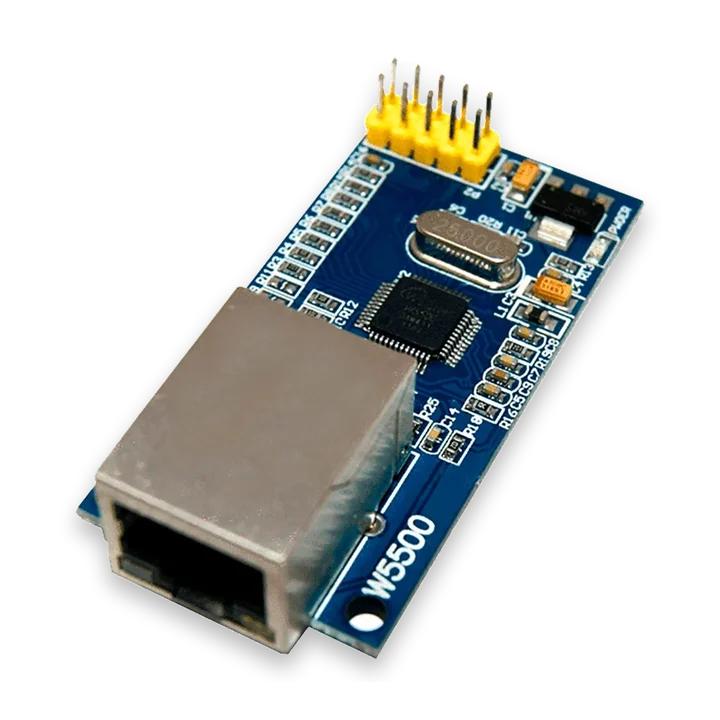
pinout photos
W5500 Ethernet pinout photos for ESP32 SPI wiring
Compare your W5500 Ethernet board with these reference photos before wiring. The common blue modules are usually sold under generic names and may swap label style or header orientation between batches, so verify VCC/3.3V, GND, SCLK, MOSI, MISO, CS/SCS, INT and RST on the board in your hand before following a diagram.
ESP32 wiring table
W5500 ESP32 wiring and common checks
Most W5500 ESP32 Ethernet problems come from SPI pin mistakes, CS conflicts, reset state, weak breadboard wiring or a missing physical link.
| W5500 module pin | ESP32 Bit Pirate connection | Check before DHCP or ping |
|---|---|---|
| VCC | 3.3 V module supply when required | Check the breakout board voltage. Some modules accept 5 V power through a regulator, but SPI logic must stay ESP32-safe. |
| GND | Common ground | Share ground with the ESP32 before checking Ethernet link or DHCP. |
| SCK, MOSI, MISO | Selected SPI pins | Match the configured ESP32 SPI pins and keep wires short, especially on breadboards. |
| CS / SCS | Dedicated chip-select GPIO | Use the configured CS pin and avoid sharing it with another active SPI device. |
| RST | Optional reset GPIO or pulled-up reset | Wire reset if the module does not initialize reliably, or confirm the breakout pulls it high. |
| INT | Optional input GPIO | Leave interrupt unwired for basic polling workflows unless the firmware mapping requires it. |
| RJ45 / link LEDs | Ethernet cable to switch or router | Confirm link LEDs, cable and switch port before debugging DHCP, ping, HTTP or Modbus. |
workflow
Start with W5500 SPI link and DHCP checks
Confirm SPI wiring, CS, reset/IRQ lines, 3.3 V power and link status before network tests. Start with DHCP or static config, then ping before HTTP, raw TCP or Modbus checks.
- 01
Wire SPI, CS, IRQ, reset if needed, 3.3 V power and common ground.
- 02
Connect Ethernet to a known network or isolated test switch.
- 03
Run
config, thenconnectto acquire DHCP before testing services. - 04
Use ping or raw TCP to separate network reachability from application bugs.
- 05
Use Modbus or HTTP recipes only on networks you own or are authorized to test.
Example CLI flow
mode ethernet
config
connect
status
ping 192.168.1.1
http get http://192.168.1.10/
Use this W5500 sequence for link, IP and ping checks before HTTP, TCP or Modbus traffic.
hardware reminders
W5500 ESP32 wiring notes before link tests
Confirm W5500 SPI wiring, CS, reset or IRQ, 3.3 V power, Ethernet link and network scope before TCP tests.
Wiring View
Run active checks only on owned or authorized networks.
If network tests fail randomly, check SPI wiring and power before blaming TCP.
Before wiring a module or target chip, check pinout, voltage, ground reference and whether the selected ESP32-S3 board has the required pins free.
task-level guides
Detailed W5500 ESP32 Ethernet recipes
Use these W5500 guides for SPI link bring-up, IP configuration, ping, HTTP and raw socket checks.
Connect W5500 Ethernet
Task-level guide with wiring, commands and troubleshooting steps.
Check HTTP endpointTask-level guide with wiring, commands and troubleshooting steps.
Check open ports with nmapTask-level guide with wiring, commands and troubleshooting steps.
Open Modbus TCP sessionTask-level guide with wiring, commands and troubleshooting steps.
Test raw TCP nc/telnetTask-level guide with wiring, commands and troubleshooting steps.
what it is
What W5500 Ethernet modules are used for
W5500 modules add SPI Ethernet to ESP32-S3 targets for wired network bring-up, service checks and industrial-style TCP workflows.
practical value
Why use W5500 with ESP32 Bit Pirate
ESP32 Bit Pirate can turn a W5500 breakout into a small network bench tool for DHCP, ping, raw TCP, HTTP, nmap-style checks and Modbus TCP sessions.
common symptoms
Common problems with W5500 ESP32 Ethernet modules
W5500 failures usually come from SPI wiring, reset/IRQ lines, 3.3 V power, link state, DHCP or the tested service itself.
No DHCP lease
Check link LEDs, cable, switch, subnet and W5500 power.
Ping works but HTTP fails
The network path is alive; check port, URL and service state.
Random disconnects
Check power, SPI cable length and reset wiring.
pages
Useful W5500 next pages
Use these links for W5500 wiring, DHCP bring-up, ping, HTTP, raw TCP, Modbus and hardware notes.
Ethernet
Ethernet reference for W5500 link, DHCP, ping, TCP and Modbus tests.
SPISPI reference for W5500 wiring, chip select and reset/IRQ checks.
ESP32-S3 DevKitBoard-specific notes for using W5500 Ethernet module with ESP32 Bit Pirate.
Connect W5500 EthernetRun config/connect, bring up DHCP and basic wired connectivity.
Check HTTP endpointTest an HTTP target from the Ethernet module.
Open Modbus TCP sessionStart a Modbus TCP workflow over wired Ethernet.
Test raw TCPOpen a raw TCP session for service checks.
Web Serial TerminalUse Web Serial for W5500 config, DHCP, ping and service checks.
Hardware ecosystemDock, adapters, level notes and physical hardware context.
module-specific answers
W5500 ESP32 Ethernet module FAQ
Quick answers about W5500 wiring, wired link status, DHCP, ping and Modbus/TCP lab checks.
Can ESP32 Bit Pirate use W5500 Ethernet?
Yes, for wired network workflows through the W5500 module path.
Is W5500 required for Wi-Fi?
No. W5500 is wired Ethernet; Wi-Fi uses the ESP32-S3 radio.
Can it test Modbus TCP?
Yes, use Modbus workflows on owned or authorized targets.
What should I test first?
Start with config, connect/status, then ping, then application-level checks.
Which protocol page is related?
Use the Ethernet protocol page and SPI references for the hardware side.
project
W5500 Ethernet inside ESP32 Bit Pirate.
The W5500 page links Ethernet protocol notes, SPI wiring, link checks, IP setup, socket tests and hardware guidance.