Most CC1101 breakout modules expect 3.3 V logic. Do not drive the radio with 5 V GPIO.
Sub-GHz radio module
CC1101 ESP32 wiring, pinout and Sub-GHz tools
Wire a CC1101 module to ESP32 or ESP32-S3 for Sub-GHz scan, receive, record and replay workflows. Start by checking the CC1101 pinout, 3.3 V power, SPI pins, CS and GDO wiring before any radio test.
Use this page when wiring a CC1101 to ESP32, checking the SPI pinout, or using ESP32 Bit Pirate as a Sub-GHz scanner for authorized lab captures. Confirm safe wiring before moving to protocol and recipe pages.
- CC1101 pinout
- ESP32 wiring
- Sub-GHz
- sniffer
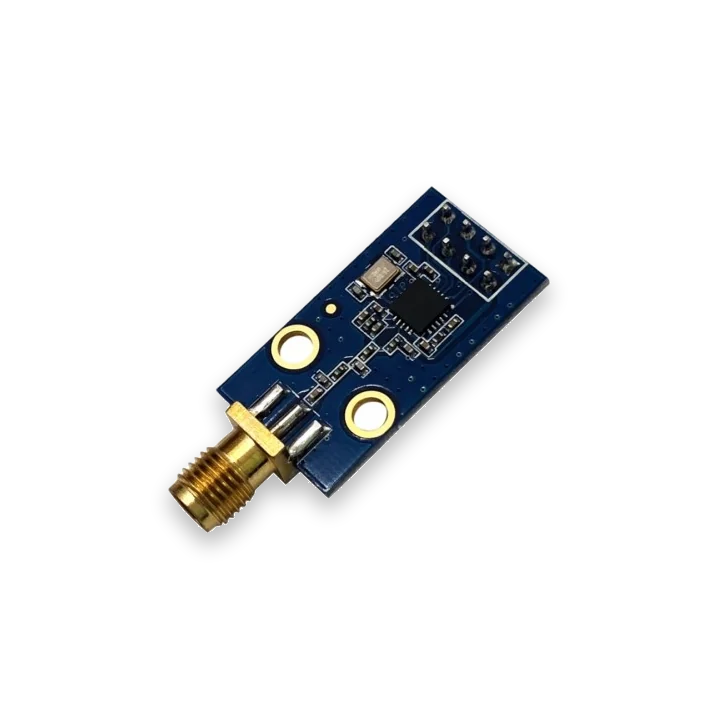
pinout photos
CC1101 pinout photos for ESP32 wiring
Compare your CC1101 board with these reference photos before wiring. Follow this pin order only when your module matches the shown SMA side, 8-pin header and silk-screen labels for VCC, GND, SCK, MOSI, MISO, CSN and GDO pins.
ESP32 wiring table
CC1101 ESP32 wiring and common checks
Most CC1101 ESP32 problems come from 5 V power, swapped SPI pins, the wrong CS pin, missing GDO wiring or a module/antenna variant that does not match the band being tested.
| CC1101 pin | ESP32 Bit Pirate connection | Check before scan or receive |
|---|---|---|
| VCC | 3.3 V only | Do not feed the CC1101 module from 5 V GPIO or a 5 V logic header. |
| GND | Common ground | Share ground with the ESP32 and the target test setup. |
| SCK, MOSI, MISO | Selected SPI pins | Verify the board pinout and keep wires short for reliable radio setup. |
| CS / CSN | Dedicated chip-select GPIO | Use the configured CS pin; a wrong CS pin looks like a dead module. |
| GDO0 / GDO2 | Input GPIO as required by workflow | Receive and scan workflows may need the GDO line wired to the configured pin. |
| Antenna | Module antenna connector | Use an antenna and CC1101 board variant for the 315, 433, 868 or 915 MHz band you are testing. |
workflow
Start with CC1101 receive-only checks
Confirm 3.3 V power, SPI pins, GDO lines and antenna before scanning. Start with sweep or receive-only captures, then record or replay only on owned, authorized lab devices.
- 01
Choose an integrated T-Embed CC1101 board or wire an external CC1101 module.
- 02
Confirm 3.3 V power, common ground and SPI/GDO wiring before powering the target.
- 03
Start with scan, sweep or waterfall before trying to decode, receive or record anything.
- 04
Receive or record only signals from hardware you own or are authorized to test.
- 05
Move from the module page to the Sub-GHz protocol page for exact firmware syntax, including receive, record, load and ear workflows.
Example CLI flow
mode subghz
config
setfrequency
scan
sweep
waterfall
receive
record
load
Use this CC1101 sequence as a receive-first check, then open the Sub-GHz page for command options and radio limits.
hardware reminders
CC1101 radio wiring notes before power
Confirm 3.3 V power, SCK/MOSI/MISO, CS, GDO wiring and an antenna matched to the CC1101 band before radio tests.
Wiring View
Use an antenna and module variant suitable for the band you are testing.
Integrated boards may already reserve the radio pins; external wiring must not reuse pins occupied by display, SD or keyboard hardware.
Before wiring a module or target chip, check pinout, voltage, ground reference and whether the selected ESP32-S3 board has the required pins free.
task-level guides
Detailed CC1101 Sub-GHz module recipes
Use these CC1101 guides for Sub-GHz wiring, receive-only scans, captures and controlled lab signal files.
Wire CC1101 Sub-GHz module
Task-level guide with wiring, commands and troubleshooting steps.
Scan Sub-GHz frequency with CC1101Task-level guide with wiring, commands and troubleshooting steps.
Sweep Sub-GHz activityTask-level guide with wiring, commands and troubleshooting steps.
Receive a Sub-GHz frameTask-level guide with wiring, commands and troubleshooting steps.
Record a Sub-GHz signal to LittleFSTask-level guide with wiring, commands and troubleshooting steps.
what it is
What CC1101 is used for
CC1101 modules are low-cost Sub-GHz radios commonly used for 315/433/868/915 MHz lab experiments, remote-control analysis, sensors and simple RF links.
practical value
Why use CC1101 with ESP32 Bit Pirate
ESP32 Bit Pirate gives the radio module a CLI and repeatable recipe workflow: scan frequency activity, receive frames, record captures and connect the RF path to board-specific wiring notes.
common symptoms
Common problems with CC1101 Sub-GHz module
CC1101 issues usually trace back to band variant, antenna, 3.3 V power, SPI chip select or GDO wiring. Check RF setup before blaming firmware.
No activity found
Check frequency, antenna, module power, CS/GDO wiring and whether the signal source is actually active.
Unstable receive
Reduce cable length, confirm 3.3 V power and keep the radio away from noisy wiring.
Wrong module variant
CC1101 breakout boards vary by frequency band and crystal quality; confirm the exact module before debugging firmware.
pages
Useful CC1101 next pages
Use these pages to move from CC1101 wiring into Sub-GHz scanning, receive captures, board choices and hardware context.
Sub-GHz
Sub-GHz mode reference for CC1101 scan, receive, record and replay commands.
SPISPI bus reference for CC1101 wiring and chip-select checks.
T-Embed CC1101Board-specific notes for using CC1101 Sub-GHz module with ESP32 Bit Pirate.
ESP32-S3 DevKitBoard-specific notes for using CC1101 Sub-GHz module with ESP32 Bit Pirate.
Wire CC1101 Sub-GHz moduleConnect power, SPI and antenna before RF tests.
Scan Sub-GHz frequencyCheck activity around a selected Sub-GHz frequency.
Receive a Sub-GHz frameCapture a frame from a known lab transmitter.
Record to LittleFSSave a Sub-GHz capture for later analysis.
Web Serial TerminalUse Web Serial to drive Sub-GHz scan, receive and record commands from the browser.
Hardware ecosystemDock, adapters, level notes and physical hardware context.
module-specific answers
CC1101 Sub-GHz module FAQ
Quick answers about CC1101 wiring, authorized Sub-GHz captures, board choice and safe receive/record tests.
Can ESP32 Bit Pirate use a CC1101 module?
Yes. ESP32 Bit Pirate includes Sub-GHz / CC1101 workflows and board-specific routes such as T-Embed CC1101.
Which board should I use for CC1101?
Use any ESP32 Bit Pirate board with enough free GPIO to wire the CC1101 module.
Can I replay arbitrary RF signals?
No. Keep RF workflows to owned, authorized lab targets and comply with local radio rules.
Is CC1101 the same as Wi-Fi or BLE?
No. CC1101 is for Sub-GHz radio, while Wi-Fi and BLE use different ESP32-S3 radio stacks.
Where should I start?
Start with the CC1101 wiring recipe, then the Sub-GHz protocol page and scan/receive recipes.
project
CC1101 Sub-GHz inside ESP32 Bit Pirate.
The CC1101 page connects Sub-GHz protocol notes, radio recipes, compatible boards and hardware wiring paths for controlled RF bench work.