SDA and SCL need pull-ups; modules may already include them.
I2C memory target
I2C EEPROM reading, writing on ESP32
Wire I2C EEPROM chips to ESP32 or ESP32-S3 and use ESP32 Bit Pirate to scan addresses, open the EEPROM shell, probe chip size, read bytes, dump EEPROM and recover I2C bus problems.
Start here when connecting 24Cxx/I2C EEPROM parts to ESP32 for address detection, the dedicated eeprom shell, safe probe/read/dump actions and bus recovery. Confirm pull-ups, voltage and chip size before writing.
- I2C
- EEPROM
- eeprom shell
- recover
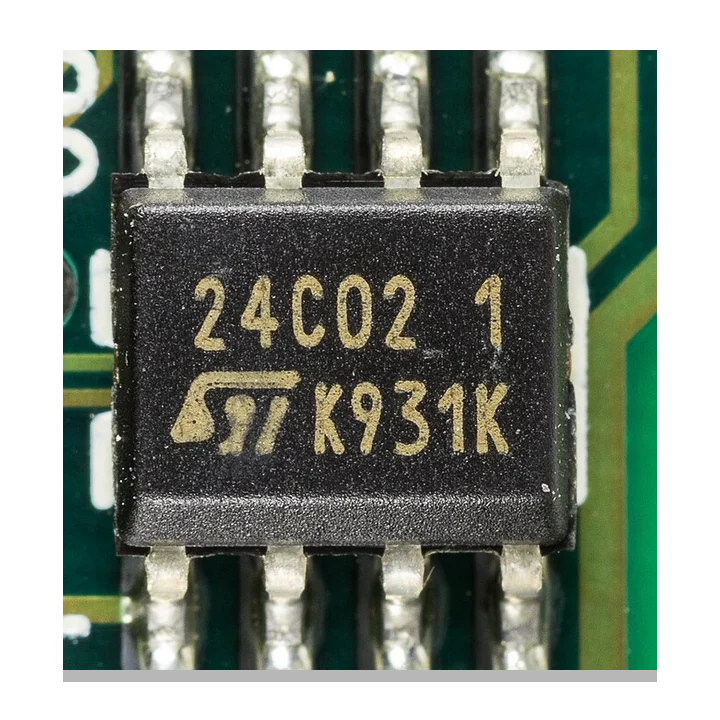
reading and writing
Start with I2C EEPROM scan and dump
Confirm the EEPROM family, voltage, address pins and pull-ups before writing. Scan the I2C bus first, then probe the chip size and create a dump before any byte write or erase action.
- 01
Identify the EEPROM family, voltage and address pin configuration.
- 02
Scan the I2C bus to confirm the responding 7-bit address.
- 03
Open the dedicated
eepromshell instead of treating EEPROM memory like generic raw registers. - 04
Use probe, analyze, read bytes and dump from the shell before any write or erase operation.
- 05
Use recovery actions if SDA or SCL is held low.
Example CLI flow
mode i2c
scan
eeprom        # default 0x50 EEPROM shell
eeprom 0x58   # EEPROM shell at a selected address
Use this as a reading and writing preview. In the EEPROM shell, start with Probe/Analyze, then Read bytes or Dump EEPROM before any write or erase action.
hardware reminders
I2C EEPROM wiring notes before power
Confirm SDA, SCL, pull-ups, address straps, write-protect state and EEPROM voltage before connecting the I2C bus.
Wiring View
The EEPROM shell handles 1-byte vs 2-byte addressing, page size and 24XX/AT24C-style chip probing better than raw register reads.
Do not write or erase until the shell has identified the chip and you have a verified backup.
Before wiring a module or target chip, check pinout, voltage, ground reference and whether the selected ESP32-S3 board has the required pins free.
task-level guides
Detailed I2C EEPROM chip recipes
Use these I2C EEPROM guides for address scans, chip probing, dumps, page writes and recovery checks.
Dump I2C EEPROM
Task-level guide with wiring, commands and troubleshooting steps.
Scan unknown I2C deviceTask-level guide with wiring, commands and troubleshooting steps.
Recover stuck I2C busTask-level guide with wiring, commands and troubleshooting steps.
Run I2C health diagnosticsTask-level guide with wiring, commands and troubleshooting steps.
what it is
What I2C EEPROM is used for
I2C EEPROMs such as 24XX / AT24C-style devices store small configuration blocks, calibration data and board identity information.
practical value
Why use I2C EEPROM with ESP32 Bit Pirate
ESP32 Bit Pirate provides a safe path from scan to the dedicated I2C EEPROM shell, then controlled probe, analyze, read, dump, write/erase and recovery actions when the bus is stuck.
common symptoms
Common problems with I2C EEPROM chip
I2C EEPROM problems usually come from pull-ups, address pins, chip size assumptions, voltage or a stuck SDA/SCL line.
No address
Check pull-ups, voltage, SDA/SCL order, address pins and ground.
Reads wrap around
The chip may use a different addressing width or size than expected.
Bus stuck low
Disconnect targets one by one and use I2C recovery flows.
pages
Useful I2C EEPROM next pages
Use these links to go from I2C EEPROM probing to dump recipes, bus recovery, board notes and browser helpers.
I2C
I2C reference for address scans, pull-ups, recovery and EEPROM shell setup.
ESP32-S3 DevKitBoard-specific notes for using I2C EEPROM chip with ESP32 Bit Pirate.
CardputerBoard-specific notes for using I2C EEPROM chip with ESP32 Bit Pirate.
Dump I2C EEPROMRead an EEPROM into a reusable binary dump.
Scan unknown I2C deviceFind addresses before deeper probing.
Recover stuck I2C busFree SDA or SCL after a failed transaction.
Web Serial TerminalUse Web Serial for EEPROM shell probing, reads and cautious write checks.
BPIO2 Bit BangUse Bit Bang I2C for direct SDA/SCL experiments or manual bus checks.
Hardware ecosystemDock, adapters, level notes and physical hardware context.
module-specific answers
I2C EEPROM chip FAQ
Quick answers about I2C EEPROM addresses, pull-ups, bus recovery, dumps and safe byte writes.
Can ESP32 Bit Pirate dump I2C EEPROMs?
Yes. Scan the bus first, then use the dedicated eeprom shell to probe, analyze, read bytes or dump the EEPROM.
Why does the scan show multiple addresses?
Some EEPROMs use address pins or banked addressing that expose multiple 7-bit addresses.
Should I write to EEPROM immediately?
No. Use the EEPROM shell to probe the chip and create a backup first, then write only when you know the chip and page layout.
Can it recover a stuck I2C bus?
Yes, use the I2C recovery action when a device holds the bus.
Which protocol page should I read?
Use the I2C protocol page for bus-level details.
project
I2C EEPROM inside ESP32 Bit Pirate.
The I2C EEPROM page connects bus scanning, chip probing, memory dumps, safe byte writes, board notes and browser serial access.