Use a solid 3.3 V supply and decoupling close to the module.
2.4 GHz RF module
NRF24L01 ESP32 wiring, pinout and RF24 tools
Wire an NRF24L01 RF24 module to ESP32 or ESP32-S3, then check SPI pins, CE, CSN and power before channel scans, payload receive tests or lab send/receive checks.
Start here when wiring NRF24L01 modules to ESP32. Stable 3.3 V power and local decoupling are critical; weak supply rails are the most common reason RF24 tests fail.
- NRF24L01 pinout
- ESP32 wiring
- SPI
- RF24
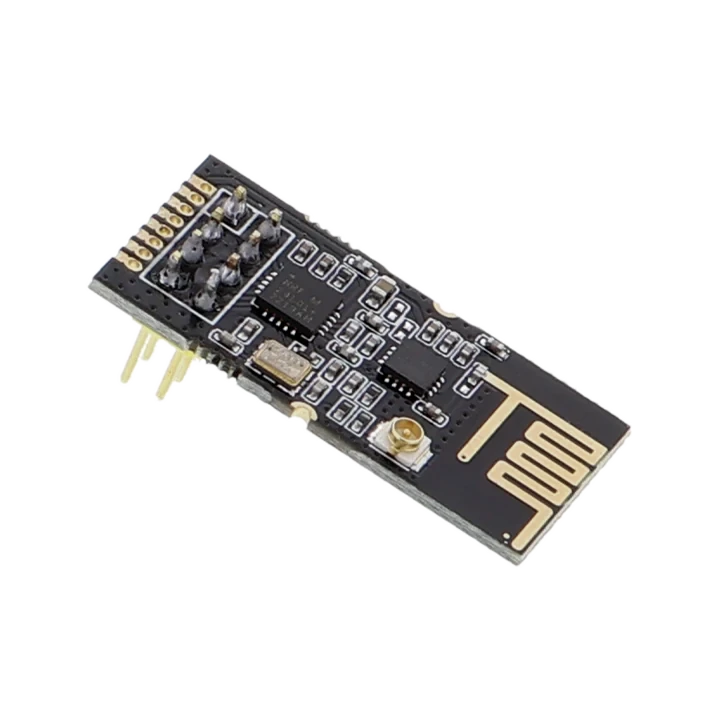
pinout photos
nRF24L01 pinout photos for ESP32 RF24 wiring
Compare your nRF24L01 board with these reference photos before wiring. PA/LNA, SMA and compact ceramic antenna variants can place CE, CSN, SCK, MOSI, MISO, IRQ, VCC and GND differently, so match the photo to the module on your bench first.
ESP32 wiring table
NRF24L01 ESP32 wiring and power checks
If an NRF24L01 is not detected or behaves randomly, check the 3.3 V rail before changing firmware settings. PA/LNA modules especially need a stable local supply.
| NRF24L01 pin | ESP32 Bit Pirate connection | Troubleshooting check |
|---|---|---|
| VCC | Stable 3.3 V | Add local decoupling and avoid powering PA/LNA boards from a weak rail. |
| GND | Common ground | Share ground with the ESP32 and the second RF24 node. |
| SCK, MOSI, MISO | Selected SPI pins | Confirm the selected board pinout and keep wires short. |
| CSN | Configured SPI chip-select GPIO | Wrong CSN wiring makes the module look missing. |
| CE | Configured output GPIO | CE is separate from CSN; both must match the firmware configuration. |
| IRQ | Optional input GPIO | Leave unused unless the workflow or firmware mapping requires it. |
workflow
Start with RF24 channel scan and receive
Confirm stable 3.3 V power, SPI wiring, CE/CSN pins and antenna placement before radio tests. Start with channel scan or receive mode, then send payloads only between your own lab nodes.
- 01
Wire SPI, CE, CSN, power and ground with short leads.
- 02
Use stable 3.3 V power; many nRF24L01 issues are supply related.
- 03
Configure pins and use
setchannelbefore sending or receiving payloads. - 04
Scan or sweep channels to understand activity in your lab.
- 05
Send and receive only on authorized test setups.
Example CLI flow
mode rf24
config
setchannel
scan
sweep
receive
send 01 02 03
Use this nRF24L01 sequence to scan channels and verify receive mode before lab-node payload tests.
hardware reminders
nRF24L01 wiring notes before radio tests
Confirm stable 3.3 V power, CE, CSN, SPI pins and antenna placement before nRF24L01 channel tests.
Wiring View
PA/LNA boards behave differently from compact PCB antenna boards.
CE and CSN are separate from the SPI CS expectations; follow the module recipe.
Before wiring a module or target chip, check pinout, voltage, ground reference and whether the selected ESP32-S3 board has the required pins free.
task-level guides
Detailed nRF24L01 RF24 module recipes
Use these nRF24L01 guides for power checks, channel scans, receive mode and lab-node payload tests.
Wire nRF24L01 RF24 module
Task-level guide with wiring, commands and troubleshooting steps.
Configure nRF24 moduleTask-level guide with wiring, commands and troubleshooting steps.
Scan RF24 channel activityTask-level guide with wiring, commands and troubleshooting steps.
Sweep RF24 channelsTask-level guide with wiring, commands and troubleshooting steps.
Send RF24 payloadTask-level guide with wiring, commands and troubleshooting steps.
Receive RF24 payloadsTask-level guide with wiring, commands and troubleshooting steps.
what it is
What nRF24L01 is used for
nRF24L01 modules are small 2.4 GHz packet radios often used in simple embedded links, sensor nodes and lab RF experiments.
practical value
Why use nRF24L01 with ESP32 Bit Pirate
ESP32 Bit Pirate gives the RF24 module a CLI-oriented setup path for channel scans, payload send/receive tests and repeatable wiring recipes.
common symptoms
Common problems with nRF24L01 RF24 module
nRF24L01 problems are often power, decoupling, CE/CSN wiring, channel/address mismatch or data-rate mismatch.
No receive
Check address/channel/data rate and whether the other node uses the same settings.
Intermittent packets
Add local decoupling and shorten wires.
Module not detected
Check CSN, CE, SPI wiring and 3.3 V power.
pages
Useful nRF24L01 next pages
Use these links for RF24 wiring, module configuration, channel scans, payload receive tests and hardware notes.
RF24
RF24 reference for channel scans, addresses, payloads and send/receive setup.
SPISPI reference for nRF24L01 wiring, CE/CSN control and bus checks.
ESP32-S3 DevKitBoard-specific notes for using nRF24L01 RF24 module with ESP32 Bit Pirate.
Wire nRF24L01 RF24 moduleConnect SPI power and CE/CSN for RF24 work.
Configure nRF24 moduleSet channel, address and payload behavior.
Scan RF24 channel activityFind active 2.4 GHz RF24 channels.
Receive RF24 payloadsListen for payloads from a lab transmitter.
Web Serial TerminalUse Web Serial for RF24 channel scans, configuration and payload receive tests.
Hardware ecosystemDock, adapters, level notes and physical hardware context.
module-specific answers
nRF24L01 RF24 module FAQ
Quick answers about nRF24L01 power, CE/CSN wiring, RF24 channel scans and lab send/receive tests.
Can ESP32 Bit Pirate use nRF24L01 modules?
Yes, through RF24-oriented workflows and wiring recipes.
Why is nRF24L01 unstable?
Power is the common issue. Use stable 3.3 V and local decoupling.
Can it scan 2.4 GHz Wi-Fi?
No. RF24 scanning is not Wi-Fi scanning; Wi-Fi uses the ESP32-S3 radio stack.
Do I need two modules?
For send/receive link testing, a second configured node is usually needed.
Where should I start?
Wire the module, configure it, then run a scan or receive recipe.
project
nRF24L01 inside ESP32 Bit Pirate.
The nRF24L01 page ties RF24 protocol notes, power-sensitive wiring, scans, receive mode and lab-node payload recipes together.